 Invoicer, a product of GK Tools
Invoicing software for builders & contractors
Finish a stage of the build and invoice it from the van or the site office, while the work is fresh in your customer’s mind.
Try 3 Months FreeVAT worked out for you, on any phone, tablet or computer.
Free builder invoice template (UK)
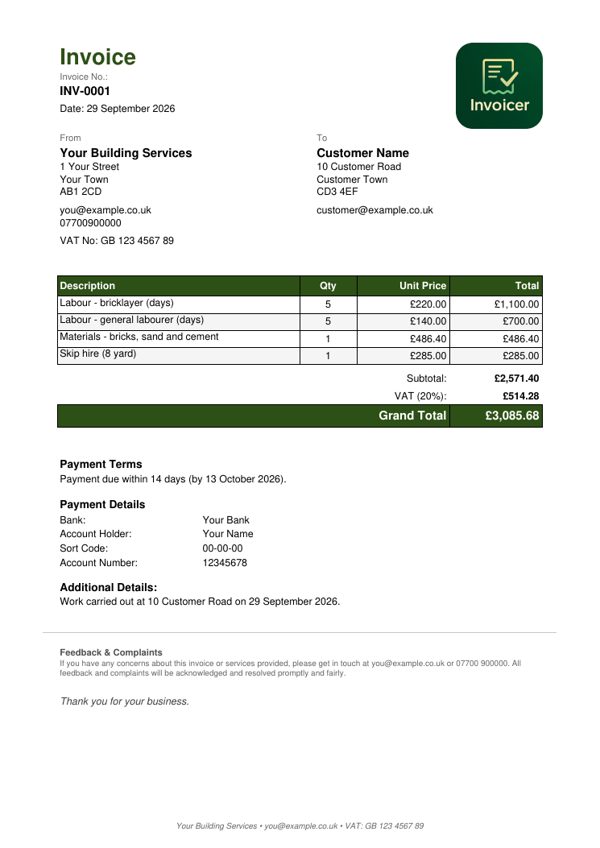
A ready-made builder invoice showing labour by the day, materials and skip hire. The example is for a VAT-registered business, so it adds VAT at 20% - if you are not VAT-registered, you do not add VAT. Download it, print it, or copy the layout - it is free and you do not need an account.
What a UK invoice needs to show
- A unique invoice number
- Your name or business name, address and contact details
- Your customer's name and address
- A clear description of the work, and the date you did it
- The date of the invoice
- The amount for each item and the total owed
- If you are VAT-registered: your VAT number and the VAT amount
Based on HMRC's guidance on invoicing customers.
Why builders choose Invoicer
Invoice from the site
Complete a stage of the build and invoice from your phone or tablet on site. The customer gets it while the work is fresh in their mind.
Stage payments made easy
Big projects paid in stages: invoice each milestone as you complete it and keep the cash flowing.
Labour and materials on separate lines
Labour, materials and subcontractors listed separately, so customers see exactly what they are paying for.
VAT sorted
VAT registered? It is worked out for you, laid out the way HMRC expects. Not registered? Turn it off.
A professional look
Your logo, business details and payment terms on every invoice, even as a one-person builder.
Insurance certificates
Keep your public liability certificate to hand and attach it when a customer or developer asks.
Know who has paid
See which stage payments have come in and which invoices are still out, across every build.
Phone, tablet or computer
Invoice from your phone on site, or from the computer at home. Everything stays in step.
Made for every kind of building work
- House extensionsExtensions, loft conversions, conservatories
- RenovationsFull house renovations and refurbishments
- General buildingBrickwork, blockwork, structural work
- New buildsNew construction projects and developments
- Building repairsProperty repairs, maintenance and fixes
- Commercial workOffice fit-outs and commercial construction
How builders use Invoicer
From a finished milestone to an invoice sent, in minutes.
Save your projects
Add the customer for each project once: homeowners, property developers or commercial clients.
Complete a stage
Foundations, first fix, second fix or completion. Each milestone is its own invoice.
Send the invoice
Pick the project, add “Extension, stage 2: first fix, £8,500 + VAT” and use the send button. A professional invoice is in their inbox straight away.
Pricing for builders
One simple price for unlimited building invoices.
Unlimited customers and invoices on both. Cancel any time from your account.
Pay as you go. Stop whenever you like.
Works out at £8.33 a month, £20 less than paying monthly.
The first 3 months are free, and no card is needed to start.
Start your free trialQuestions from builders
- Can I invoice for stage payments?
- Absolutely. Perfect for big projects paid in stages. Invoice for each milestone as you complete it - foundation, first fix, second fix, completion. Keeps your cash flow healthy throughout the build.
- Can I break down labour and materials separately?
- Yes. Add multiple line items: "Labour - 5 days @ £200", "Materials - bricks and cement", "Subcontractor - plastering". Customers see exactly what they're paying for.
- Is it suitable for both small jobs and big projects?
- Yes. From a £500 repair job to a £50,000 extension - works the same way. Small jobs get quick invoices, big projects can have detailed breakdowns.
- Can I attach my insurance certificates?
- Yes. Upload your public liability insurance, trade certifications, and any other documents. Attach them when customers, architects, or project managers request proof.
- Will it work for trade endorsement schemes?
- Every invoice carries a unique, traceable number, a professional layout, and all your business details - the things schemes such as TrustMark or Checkatrade usually ask to see. Invoicer is not affiliated with any scheme, so check the specific requirements of the one you are applying to.
Not your trade?
Invoicer is set up just as well for gardeners and landscapers, electricians, plumbers and heating engineers, sole traders, older tradespeople who want big, clear screens, members of trade schemes and anyone invoicing from a phone.
Send your next stage invoice from the van
Invoice each stage as you finish it and keep the cash flowing through the whole build.
Try 3 Months FreeNo card needed. Works on any phone, tablet or computer.