 Invoicer, a product of GK Tools
Invoicing software for electricians
Finish the electrical job and send a professional invoice from your phone in the van, before you’ve even left the site. Simple invoicing for sparkies, so you get paid faster.
Try 3 Months FreeAn invoice in 60 seconds, VAT worked out for you, on any phone.
Free electrician invoice template (UK)
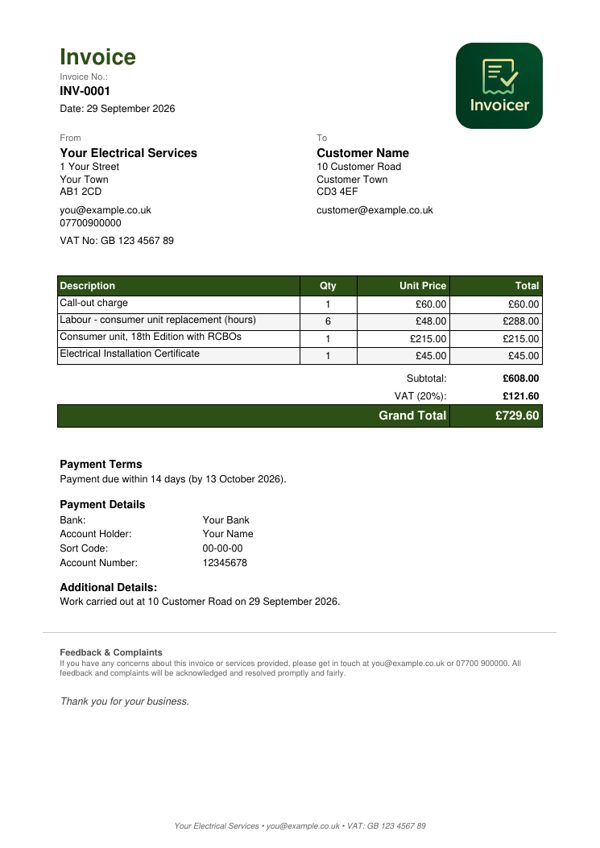
A ready-made electrician invoice showing a call-out charge, labour, parts and a certificate. The example is for a VAT-registered business, so it adds VAT at 20% - if you are not VAT-registered, you do not add VAT. Download it, print it, or copy the layout - it is free and you do not need an account.
What a UK invoice needs to show
- A unique invoice number
- Your name or business name, address and contact details
- Your customer's name and address
- A clear description of the work, and the date you did it
- The date of the invoice
- The amount for each item and the total owed
- If you are VAT-registered: your VAT number and the VAT amount
Based on HMRC's guidance on invoicing customers.
Why electricians choose Invoicer
Invoice from the job site
Finish the electrical work and invoice from your van while the job’s fresh. The customer gets it before you drive away.
VAT sorted
If you are VAT registered, VAT is worked out and shown correctly on every invoice, with no calculator needed. Not registered yet? Turn it off. Simple either way.
Certificates and insurance
Upload your public liability insurance, Part P certification and NICEIC/NAPIT details once. Attach them to invoices when customers or scheme providers ask for them.
Unique invoice numbers
Every invoice is numbered for you: your own prefix, the year, and a number that runs in order. Easy to trace, and nothing repeats.
Your business logo
Upload your logo and it appears on all invoices. Looks professional and builds your electrical business brand.
Track payments
See which jobs are paid and which invoices are outstanding. Chase payments before they get forgotten and keep on top of cash flow.
Phone, tablet or computer
No laptop needed: create and send invoices from your mobile between jobs, with big buttons and easy typing. Or use whatever’s handy. Everything stays in step between your devices.
Made for every kind of electrical work
- Domestic electricalRewires, consumer units, fault finding
- Commercial electricalOffice electrical work, emergency lighting
- Electrical installationNew installations, additional sockets, lighting
- Testing and inspectionEICR testing, periodic inspections
- Electrical repairsEmergency call-outs, fault repairs
- Electrical maintenanceOngoing maintenance contracts
How electricians use Invoicer
From testing complete to the invoice sent, in under a minute.
Save your customers
Add customer details once: name, address, email. Perfect for regular call-out customers or ongoing contracts.
Complete the job
Pack up your tools, do your final tests, get back to the van.
Send the invoice in 60 seconds
Pick the customer, add “Consumer unit upgrade, £450 + VAT” and use the send button. A professional invoice with the correct VAT lands in their inbox. Move on to your next job.
Pricing for electricians
One simple price for unlimited electrical invoices.
Unlimited customers and invoices on both. Cancel any time from your account.
Pay as you go. Stop whenever you like.
Works out at £8.33 a month, £20 less than paying monthly.
The first 3 months are free, and no card is needed to start.
Start your free trialQuestions from electricians
- Does it handle VAT properly?
- Yes! If you're VAT registered, it calculates 20% VAT, shows it clearly on invoices, and gives you totals for your VAT returns. Proper VAT invoices that meet HMRC requirements.
- Can I attach my NICEIC/NAPIT certificate?
- Yes. Upload your registration certificates, public liability insurance, and any other documents. Attach them to invoices when customers or contractors ask for proof.
- Is it suitable for emergency call-outs?
- Perfect for it. Invoice immediately from your phone while still at the customer's property. Get it sent before you leave so they can't "forget" about the bill.
- Can I use it for both small jobs and big rewires?
- Absolutely. From a £50 socket replacement to a £5,000 rewire - works the same way. Add multiple line items for bigger jobs.
- Will it work for my trade scheme application?
- Every invoice carries a unique, traceable number, a professional layout, and all your business details - the things endorsement schemes usually ask to see. Check your scheme's own requirements, as each one differs slightly.
Not your trade?
Invoicer is set up just as well for gardeners and landscapers, plumbers and heating engineers, builders, sole traders, older tradespeople who want big, clear screens, members of trade schemes and anyone invoicing from a phone.
Send the invoice before you leave the site
Send the invoice from the van, and get paid while the job is still fresh in the customer’s mind.
Try 3 Months FreeNo card needed. Works on any phone, tablet or computer.